How to Build an Autonomous Obstacle Avoidance Robot Car with Arduino & Ultrasonic Sensor
Step-by-step DIY Instructables guide to constructing an autonomous 2WD/4WD obstacle avoidance robot car using Arduino UNO, L298N motor driver, and ultrasonic sensor.
How to Build an Autonomous Obstacle Avoidance Robot Car with Arduino & Ultrasonic Sensor
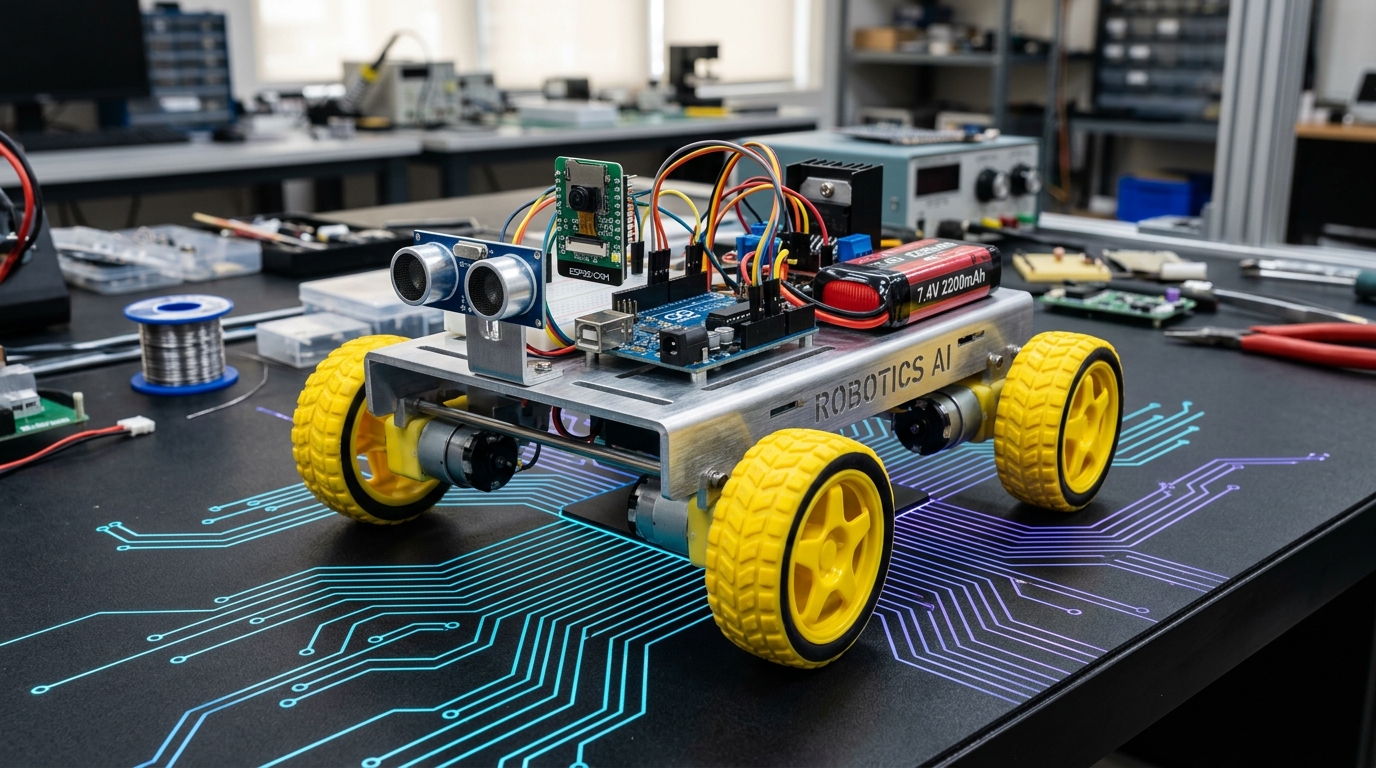
Building an autonomous obstacle avoidance robot car is the quintessential rite of passage for every maker and robotics engineer. This robot maneuvers independently through cluttered environments, detects obstacles in its path using high-frequency ultrasonic echo ranging, stops in real time, scans left and right with a micro servo, and pivots into clear space without human intervention.
What you will build: A complete 2WD/4WD wheeled rover with differential steering, powered by an Arduino UNO and L298N Dual H-Bridge motor driver, navigating around furniture, walls, and pets with zero collisions.
1. Bill of Materials (BOM)
All components are available right here in the Unik Systems store:
- 1× Arduino UNO R3 (or Arduino Nano on a breakout shield)
- 1× L298N Dual H-Bridge Motor Driver Module (2A per channel)
- 1× Ultrasonic Ranging Sensor Module (HC-SR04 with mounting bracket)
- 1× SG90 / MG90S Micro Servo Motor (for panning the ultrasonic sensor)
- 1× 2WD / 4WD Robot Car Chassis Kit (includes acrylic chassis, 2/4 BO gear motors, and matching rubber wheels)
- 1× 18650 Dual-Slot Battery Holder with 2× 3.7V rechargeable Li-ion batteries (7.4V total)
- 1× Mini On/Off Toggle Switch
- 1× Solderless Breadboard or Proto Shield
- Pack of Female-to-Male and Male-to-Male jumper wires
2. Circuit Diagram & Wiring Table
The L298N driver isolates high-current inductive motor spikes from the sensitive 5V microcontroller logic. Connect the modules as follows:
| Component | Pin | Connects to | Purpose | |---|---|---|---| | L298N Driver | +12V | Battery Positive (+7.4V) | Motor power rail | | L298N Driver | GND | Battery Negative (-) & Arduino GND | Common system ground (CRITICAL) | | L298N Driver | +5V Logic | Arduino 5V In (or leave onboard 5V regulator ON) | Logic supply | | L298N Driver | IN1 & IN2 | Arduino D5 & D6 | Left motor forward & reverse | | L298N Driver | IN3 & IN4 | Arduino D9 & D10 | Right motor forward & reverse | | Ultrasonic Sensor | VCC | Arduino 5V | Sensor power | | Ultrasonic Sensor | GND | Arduino GND | Sensor ground | | Ultrasonic Sensor | Trig | Arduino D12 | Ultrasonic trigger pulse output | | Ultrasonic Sensor | Echo | Arduino D11 | Ultrasonic echo duration input | | Servo Motor | Signal (Orange) | Arduino D3 (PWM) | Sensor panning angle control | | Servo Motor | VCC (Red) & GND | 5V & GND | Servo power |
   ┌────────────────┐       ┌──────────────────────┐
   │  Arduino UNO   │       │  L298N Motor Driver  │
   │                │       │                      │
   │  D5  ──────────┼───────┼► IN1                 │
   │  D6  ──────────┼───────┼► IN2   Motor Left ◄──┤
   │  D9  ──────────┼───────┼► IN3                 │
   │  D10 ──────────┼───────┼► IN4   Motor Right ◄─┤
   │  D3  ──────────┼─► [Servo MG90S]              │
   │  D11 ◄─────────┼─► Echo [Ultrasonic]          │
   │  D12 ──────────┼─► Trig [Ultrasonic]          │
   │  GND ──────────┴───────┴► Common Ground       │
   └────────────────┘       └──────────────────────┘
3. Step-by-Step Mechanical Assembly
- Mount BO Motors to the Chassis: Fit the BO DC gear motors into the acrylic base plate slots and fasten them tightly with long M3 screws and nuts. Slide the rubber wheels onto the flattened D-shafts.
- Mount the Caster Wheel: Fasten the front omni-directional ball caster wheel using the brass standoffs so the chassis rests completely horizontal.
- Install the Motor Driver & Controller: Secure the L298N module at the rear center and the Arduino UNO near the front center using M3 nylon standoffs to avoid shorts.
- Assemble the Ultrasonic Turret: Glue or screw the micro servo to the front bumper. Fasten the ultrasonic sensor bracket to the servo horn, allowing it to sweep from 0° (right) to 90° (center) to 180° (left).
- Battery Cage Installation: Fasten the 2x 18650 battery holder underneath or on the top tier. Route through a rocker switch to the +12V terminal of the L298N.
4. Arduino Control Sketch
Upload this sketch via the Arduino IDE:
cpp#include <Servo.h>

// Motor driver pin assignments
const int IN1 = 5;
const int IN2 = 6;
const int IN3 = 9;
const int IN4 = 10;

// Ultrasonic sensor pins
const int TRIG_PIN = 12;
const int ECHO_PIN = 11;

// Servo object
Servo headServo;
const int SERVO_PIN = 3;

// Threshold distance in centimeters
const int STOP_DISTANCE_CM = 25;

void setup() {
  pinMode(IN1, OUTPUT);
  pinMode(IN2, OUTPUT);
  pinMode(IN3, OUTPUT);
  pinMode(IN4, OUTPUT);

  pinMode(TRIG_PIN, OUTPUT);
  pinMode(ECHO_PIN, INPUT);

  headServo.attach(SERVO_PIN);
  headServo.write(90); // Face forward
  delay(1000);
}

long getDistance() {
  digitalWrite(TRIG_PIN, LOW);
  delayMicroseconds(2);
  digitalWrite(TRIG_PIN, HIGH);
  delayMicroseconds(10);
  digitalWrite(TRIG_PIN, LOW);

  long duration = pulseIn(ECHO_PIN, HIGH, 30000); // 30ms timeout (~5m)
  if (duration == 0) return 999; // No echo detected
  return duration * 0.034 / 2;   // Speed of sound = 340m/s
}

void moveForward() {
  digitalWrite(IN1, HIGH);
  digitalWrite(IN2, LOW);
  digitalWrite(IN3, HIGH);
  digitalWrite(IN4, LOW);
}

void moveBackward() {
  digitalWrite(IN1, LOW);
  digitalWrite(IN2, HIGH);
  digitalWrite(IN3, LOW);
  digitalWrite(IN4, HIGH);
}

void turnLeft() {
  digitalWrite(IN1, LOW);
  digitalWrite(IN2, HIGH);
  digitalWrite(IN3, HIGH);
  digitalWrite(IN4, LOW);
}

void turnRight() {
  digitalWrite(IN1, HIGH);
  digitalWrite(IN2, LOW);
  digitalWrite(IN3, LOW);
  digitalWrite(IN4, HIGH);
}

void stopMotors() {
  digitalWrite(IN1, LOW);
  digitalWrite(IN2, LOW);
  digitalWrite(IN3, LOW);
  digitalWrite(IN4, LOW);
}

void loop() {
  long forwardDistance = getDistance();

  if (forwardDistance > STOP_DISTANCE_CM) {
    moveForward();
  } else {
    stopMotors();
    delay(200);

    // Back up slightly
    moveBackward();
    delay(300);
    stopMotors();

    // Look left
    headServo.write(160);
    delay(400);
    long leftDistance = getDistance();

    // Look right
    headServo.write(20);
    delay(400);
    long rightDistance = getDistance();

    // Center servo back
    headServo.write(90);
    delay(200);

    // Decide navigation path
    if (leftDistance > rightDistance && leftDistance > STOP_DISTANCE_CM) {
      turnLeft();
      delay(400);
    } else if (rightDistance >= leftDistance && rightDistance > STOP_DISTANCE_CM) {
      turnRight();
      delay(400);
    } else {
      // Dead end - 180 spin
      turnRight();
      delay(800);
    }
    stopMotors();
    delay(100);
  }
}
5. Troubleshooting & Gotchas
- Common Ground: Always tie the L298N GND to the Arduino GND. Omitting common ground causes floating signals where motors twitch erratically or fail to respond.
- Servo Jitter: When motors run, they draw burst currents. If the servo jitters, add a 470µF electrolytic capacitor across the 5V and GND rail near the servo.
- Inverted Wheels: If the robot drives backwards when
moveForward()is called, swap the two wires on the motor terminal blocks.
Parts used in this tutorial
Buy them in one click — ships from Pune across India.
- Arduino UNOMicrocontrollers₹265.58+ GST
- L298N 2A Based Motor Driver ModuleMotors & Actuators₹135.00+ GST
- DC Plastic Gear Motor with Wheel (BO)Motors & Actuators₹75.88+ GST
- RC Car KitKits₹2,000.00+ GST