
All products · 3 of 1440
Electronics, sensors, robotics kits, PC components, peripherals — everything Unik Systems carries, in one place.
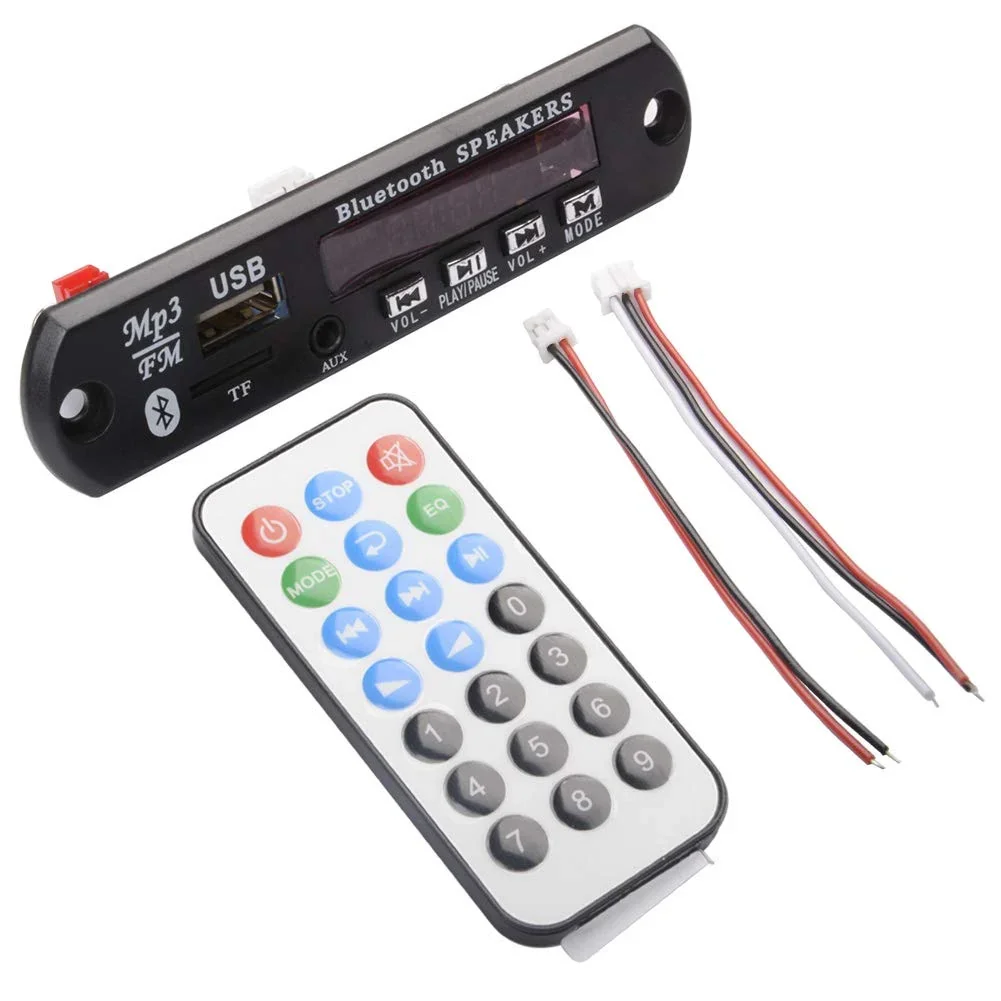
Bluetooth MP3 Decoding Board Module with inbuilt SD Card Slot / USB / FM / and Remote Control
[Audio, Audio Receiver] Bluetooth MP3 Decoder Board Module with USB, SD Card, FM Radio, AUX & Remote Control The Bluetooth MP3 Decoder Board Module is a compact and versatile multimedia audio player designed to add multiple audio playback options to DIY speakers, amplifier systems, home theaters, car audio systems, portable speakers, and custom audio projects. It combines Bluetooth, USB, SD/TF card, AUX input, and FM radio functions in a single convenient module. The module can be connected to a compatible audio amplifier board to create a complete multimedia audio system. It features a clear LCD display for displaying playback information, input mode, track details, and FM frequency. An included IR remote control allows convenient wireless operation from a distance. With support for popular audio formats including MP3, WMA, WAV, FLAC, and APE, the module provides flexible playback options for different music sources. ⭐ Key Features Bluetooth wireless audio receiver Built-in USB port for music playback Built-in SD/TF card slot FM radio function AUX audio input Supports USB / SD / Bluetooth / FM / AUX source selection Stereo digital audio output LCD display for playback information Includes IR remote control Supports folder selection and organized playback Supports Bluetooth stereo audio Hands-free calling support as specified Compact design for easy installation Suitable for DIY audio projects 📋 Technical Specifications Product Type: Bluetooth MP3 Decoder Board Bluetooth: Bluetooth Audio Receiver Audio Output: Stereo Digital Audio Output Input Sources: Bluetooth / USB / SD (TF) Card / AUX / FM USB Support: Yes SD/TF Card Slot: Yes FM Radio: Yes AUX Input: Yes Display: Seven segment Display Remote Control: IR Remote Included Audio Formats: MP3 / WMA / WAV / FLAC / APE Bluetooth Function: Wireless Audio Playback / Hands-Free Calling Playback Function: Folder Selection & Music Playback Installation: Audio Amplifier / DIY Speaker System Application: DIY Speakers, Home Theater, Car Audio, Portable Audio Systems Mounting Type: Panel / Enclosure Mount Power Supply: Refer to the specific module version before connection Output Connection: Connect to a compatible amplifier input Module Type: Multi-Function Audio Decoder Board 🔧 Applications DIY Bluetooth Speakers Portable Speaker Systems Home Theater Upgrades Car Audio Modification Amplifier Projects Multimedia Speaker Repair Custom Audio Systems DIY Music Players Portable Audio Systems Electronic Audio Projects 🛠️ How It Works The module works as a multi-function audio source and decoder. Select Bluetooth, USB, SD/TF card, AUX, or FM radio as the required audio source. The module decodes the selected audio signal and provides a stereo audio output that can be connected to a compatible amplifier board. For a DIY speaker project, connect the decoder module to a suitable amplifier and then connect the amplifier to the speakers. The included IR remote can be used to control playback, mode selection, track selection, volume, and other supported functions. 🔌 Installation Connect the module to a compatible power supply according to the specifications of the particular module version. Connect the audio output to the input of a suitable amplifier board and connect the amplifier output to the speakers. Insert a compatible USB drive or SD/TF card containing supported audio files, or pair the module with a Bluetooth device. AUX input and FM radio can also be selected using the module controls or remote control. 📦 Package Includes 1 × Bluetooth MP3 Decoder Board Module with USB / SD / FM / AUX 1 × IR Remote Control 1 × Power & Signal Connecting Cable ⚠️ Precautions This module is not recommended for beginners without basic electronics knowledge. Check the module's required supply voltage and polarity before powering it. Ensure all wiring is correct before switching on the power. Connect the audio output to a compatible amplifier input. Do not connect speakers directly to the decoder output unless confirmed by the specific module version. Avoid short circuits between power and signal connections. Do not expose the board to water or excessive moisture. We are not responsible for damage caused by incorrect wiring, improper installation, or misuse.
 Out of stock
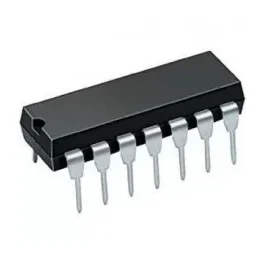
74HC47 or 74LS47 IC BCD to seven segment decoder driver
[Logic Gates IC] 7447 or 74LS47 decodes BCD into 7 Segments, which means it accepts a binary coded decimal or BCD Values as input and decoded into a pattern that drives a 7-segment for displaying digits 0 to 9, so its name is BCD to 7 segment driver or decoder. Its input is 4 lines BCD data and generates complements as output. The generation of complement data of BCD is internally so no coding or programming is required to generate it. Specification Large Voltage range Has open collector output which directly drives indicator Has a wide range of operating conditions No need for external resistors because of internal pull-ups No high-speed termination because of the input clamp diode 4 the number of input lines and 7 output lines Pin Description BCD input 2 BCD input 3 LT RBO RBI BCD input 4 BCD input 1 GND E D C B A G F VCC
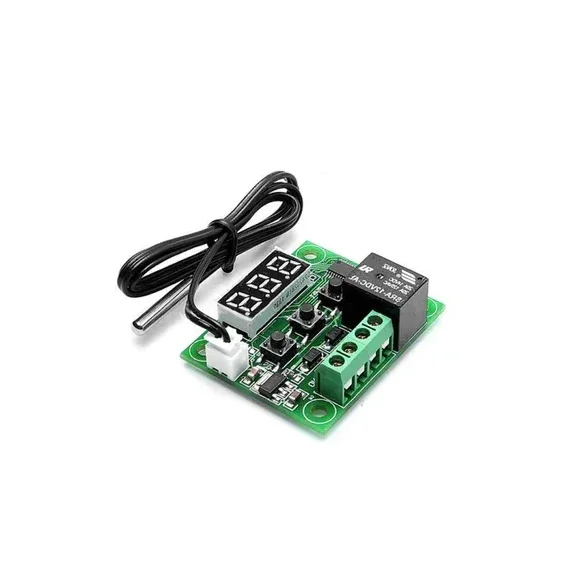
W1209 Digital Temperature Controller Thermostat Module with Display and Waterproof Temperature Sensor
[Temperature Sensor] XH W1209 12V Digital Temperature Control Module + Display and NTC Temp Sensor This is XH W1209 digital temperature controller Module W/ Display and NTC Waterproof Temperature Sensor. W1209 Mini thermostat Temperature controller is low-cost 12V Temperature controller with 7-segment display and 3 switch keypad for setting temperature and other parameters. The module features an NTC thermistor temperature sensing and has an accuracy of 0.1 C. The XH W1209 digital temperature controller Module W/ Display and NTC Waterproof Temperature Sensor is an incredibly low cost yet highly functional thermostat controller. With this module, you can intelligently control power to most types of electrical device based on the temperature sensed by the included high accuracy NTC temperature sensor. Although this module has an embedded microcontroller no programming knowledge is required. 3 tactile switches allow for configuring various parameters including on & off trigger temperatures. The onboard relay can switch up to a maximum of 240V AC at 5A or 14V DC at 10A. We can display current temperature in degrees Centigrade via its 3 digit seven segment display and the current relay state by an onboard LED. DISPLAYING THE CURRENT TEMPERATURE The thermostat will display the current temperature in °C by default. When in any other mode making no input for approximately 5 seconds will cause the thermostat to return to this default display. SETTING THE TRIGGER TEMPERATURE To set the trigger temperature press the button marked ‘SET’. The seven-segment display will flash. You can now set a trigger temperature (in °C) using the ‘+’ and ‘-‘ buttons in 0.1° increments. If we didn’t press any buttons for approximately 2 seconds the trigger temperature will be store and the display will return back to the current temperature. SETTING THE PARAMETERS To set any parameter first long press the ‘SET’ button for at least 5 seconds. The seven-segment display should now display ‘P0’. This represents parameter P0. Pressing the ‘+’ or ‘-‘ buttons will cycle through the various parameters (P0 to P6). Pressing the ‘SET’ button whilst any of these parameters are displayed will allow you to change the value for that parameter using the ‘+’ and ‘-‘ buttons. When finished setting a parameter press the set button to exit that option. If no buttons are pressed for approximately 5 seconds the thermostat will exit the parameter options and will return back to the default temperature display. SETTING THE COOLING OR HEATING PARAMETER P0 The parameter P0 has two settings, C and H. When setting to C (default) the relay will energize when the temperature is reached. Use this setting if connecting to an air-conditioning system. When set to H the relay will de-energize when the temperature is reached. Use this setting if controlling a heating device. SETTING THE HYSTERESIS PARAMETER P1 This sets how much change in temperature must occur before the relay will change state. For example, if set to the default 2oC and the trigger temperature has been set to 25oC, it will not de-energize until the temperature falls back below 23oC. Setting this hysteresis helps stop the thermostat from continually triggering when the temperature drifts around the trip temperature. SETTING THE UPPER LIMIT OF THE THERMOSTAT PARAMETER P2 This parameter limits the maximum trigger temperature that can be set. It is useful as a safety to stop an excessively high trigger temperature from accidentally being set by the user. SETTING THE LOWER LIMIT OF THE THERMOSTAT PARAMETER P3 This parameter limits the minimum trigger temperature that can be set. It is useful as a safety to stop an excessively low trigger temperature from accidentally being set by the user. SETTING TEMPERATURE OFFSET CORRECTION PARAMETER P4 Should you find there is a difference between the displayed temperature and the actual temperature; (for instance, if the temperature probe is on a long run of cable) you can make minor corrections to the temperature reading with this parameter. SETTING THE TRIGGER DELAY PARAMETER P5 To reach trigger temperature this parameter allows for delaying switching of the relay. The parameter can be set in one-minute increments up to a maximum of 10 minutes. SETTING THE HIGH-TEMPERATURE ALARM PARAMETER P6 Setting a value for this parameter will cause the relay to switch off when the temperature reaches this setting. The seven-segment display will also show ‘—‘ to indicate an alarm condition. The relay will not re-energize until the temperature falls below this value. The default setting is OFF.